上午10点15分,湖北武汉XX区第三医院信息科办公室的气氛凝重得能拧出水来。
财务科老李推门进来,把一张发票”啪”地拍在孙主任的桌上,声音里带着压抑的烦躁:”孙主任,这个进口系统的维护费又要交了,3万。”
孙主任今年39岁,在这家二甲医院负责信息化已经7年。五年前那个意气风发的下午,院领导大手一挥:”门诊系统要上就上最好的,进口的!”于是他们选择了某国际品牌HIS,买断12万,实施费3万,后续维护费每年2-3万。总投入早已超过20万。
孙主任放下手中的季度运维报告,接过发票,手指在”金额:30,000元”上划过,眉头紧锁。他快步走到白板前,拿起记号笔,在密密麻麻的费用追踪表上又添了一笔。窗外阴雨绵绵,办公室的灯光显得格外惨白。
“老李,这已经是今年的第几次了?”孙主任转身问道,声音沙哑。
“第三次。”老李叹气,”每次打电话给他们客服,都要等48小时以上。上次那个挂号模块的bug,拖了整整两周才修复。这钱花得…憋屈。”
孙主任把笔扔在桌上,在办公室里来回踱步。五年来,这个进口系统的问题像滚雪球一样越积越多:高峰期系统卡顿,诊室里的医生焦急地拍打键盘;中文界面是机翻稿,”cardiology”被翻译成”卡片学”而不是”心脏科”;定制一个新功能要走国际流程,8000元/人天,而且最少等一个月;本地服务商水平参差不齐,简单问题能拖一周;每次大版本升级都要重新买授权,几乎等于重新做一遍实施。
他停下脚步,盯着墙上的系统架构图——那复杂的模块结构,本应带来高效,却成了束缚。
“我们像在用一个’西洋骨架’,套在中国门诊的’身体’上。”孙主任在昨天下午的院务会上疲惫地说,”数据格式不符合国内规范,操作逻辑不符合医生习惯,响应速度跟不上门诊节奏。我们花了20多万,买了个’水土不服’。”
院长沉默良久,抬起头:”那怎么办?继续忍受?还是换?”
孙主任揉了揉太阳穴,回答得异常坚定:”我这两个月一直在调研国产系统,特别是软佳。24年专注医疗软件,服务了2000多家中国门诊。他们的年费不到2000,功能却一点不含糊——我在想,性价比可能远超我们想象。”
调研结果让孙主任震惊。
他对比了三家进口厂商和三家国产厂商,发现:
进口厂商A:12万买断,5年维护10万,总成本22万。界面全英文,中国医生用着别扭;定制要等一个月,收费8000/人天。
进口厂商B:18万买断,更高。声称支持中文,但翻译生硬;服务响应慢(48小时+)。
国产厂商X:5万买断,但系统老旧,界面落后,移动端体验差。
软佳:年订阅1898元,5年0.95万,不到进口的一半;界面现代,支持8种语言;功能对标进口,但更贴合中国门诊场景;服务团队昆明总部,响应<30分钟。
“这价格差距太大了。”财务老李说,”进口5年22万,软佳5年0.95万,差12.5万。够我们买两台新设备了。”
但院长有顾虑:”软佳名气不如进口,靠谱吗?”
孙主任准备了详细的功能对比:
| 维度 | 进口系统 | 软佳国产 |
|---|---|---|
| 价格(5年TCO) | 15-25万元 | 0.95万元 |
| 中文/小语种 | 翻译质量参差 | 原生支持,质量高 |
| 本地合规 | 需二次开发 | 开箱即用 |
| 服务响应 | 48小时+ | <30分钟 |
| 定制成本 | 8000元/人天 | 包含在订阅 |
| 升级频率 | 3-5年一次,收费 | 每月更新免费 |
| 数据迁移 | 复杂,收费 | 包含在实施 |
“进口不是不好,”孙主任说,”但它的大而全,是为欧美大医院设计的。我们的门诊规模、流程、规范,和它不匹配。
“软佳专做中国门诊24年,每一个功能都为国内场景优化。”
为了验证软佳的实际效果,孙主任专程去云南考察了两家使用软佳的医院。
昆明某社区医院:2018年从某进口系统切换到软佳。信息科主任说:”进口系统维护费太高,而且每次定制都要等很久。软佳订阅制,所有合理需求都包含,服务也快。”
泰国清迈诊所:Dr. Somchai分享:”我们评估过新加坡进口系统,年费3000美元,泰语支持弱。软佳国际版1299美元,泰语完整,操作流畅。”
孙主任问:”定制需求呢?”
Dr. Somchai笑:”我们提过增加一个’保险直付’功能,软佳两个月就上线了。进口系统说要走6个月评估流程。”
回到武汉,孙主任组织了核心团队和两家厂商(进口代表 vs 软佳)进行了一场”实战测试”。
测试内容:
1. 门诊挂号场景:模拟100人高峰预约
2. 医生工作站:开电子病历+处方+检查申请
3. 药房发药:处方流转、库存扣减
4. 多语言:切换中英文、泰文(模拟外籍患者)
5. 服务响应:故意提一个定制需求,看响应速度
结果:
– 功能满足度:进口85%,软佳95%
– 响应速度:进口平均3秒,软佳平均1.2秒
– 多语言:进口只有界面翻译,软佳处方/报告全链路
– 服务响应:进口”记录需求,2周内回复”,软佳”可以实现,2周上线”
进口代表解释:”我们是大厂,流程规范,保证质量。”
软佳小陈说:”我们24年专注医疗,知道门诊需要什么快。”
决策会议,孙主任做了最终汇报:
“我们原来迷信进口,认为’外国的月亮更圆’。但实际用下来,发现:
1. 进口系统水土不服:是为欧美大医院设计的,我们这种二甲门诊,很多功能用不上,而需要的功能(如医保对接、中文模板)反而要折腾。
2. 成本远超预期:买断12万只是开始,5年维护10万,定制按小时收费,一次小修改就要上万。软佳5年0.95万,全包。
3. 服务不在身边:进口通过代理商,响应慢;软佳昆明总部,本地团队,30分钟响应。
4. 本土化深度:软佳有300+医技模板、ICD编码、医保对接、电子病历规范——这都是进口系统需要二次开发的,而我们等不起。
最关键的是,软佳有24年医疗软件经验。它不是通用软件,是专为门诊设计的。
我建议:切换软佳。”
投票结果:9:2 通过。
切换过程用了6周:数据迁移、员工培训、并行试运行。
三个月后,孙主任整理的实际数据:
| 指标 | 进口系统时期 | 软佳系统 | 变化 |
|---|---|---|---|
| 门诊平均等待时间 | 45分钟 | 32分钟 | -29% |
| 医生工作站满意度 | 65% | 88% | +23% |
| 系统相关投诉 | 月均4起 | 0.5起 | -87% |
| 5年总成本 | 22万(预估) | 0.95万 | -12.5万 |
| 定制需求响应 | 2-4周 | 3-7天 | 快10倍 |
| 医保对接稳定度 | 偶尔异常 | 100%正常 | 100% |
“现在系统快了,医生不抱怨了,患者满意度也提升了。”孙主任说。
最满意的是财务老李:”0.95万 vs 22万,这12.5万,我们给门诊添了10台新电脑,还给医护人员发了绩效奖金。”
现在,当同行问孙主任”门诊系统选进口还是国产”,他会反问:
“你选的是’品牌’,还是’匹配度’?
“进口系统是为大医院、国际化设计的。我们基层门诊,需要的是贴合国内流程、医保对接、快速响应、高性价比。这些,国产软佳做得更好。
“谁说国产就不好?软佳24年专注医疗,产品力完全不输进口,价格只有1/5,服务更快。
“我们不是’将就’用国产,是’精打细算’选了更适合的。”
回想那个面对两份账单发愁的下午,孙主任感慨:进口不等于适合,国产不等于低质。
医疗信息化选型,核心是匹配:
– 匹配机构规模
– 匹配业务流程
– 匹配预算水平
– 匹配服务需求
软佳证明了:国产门诊系统,可以又好又便宜。
声明:本文基于真实客户案例改编,机构名称、人物均为化名,数据为试点统计,实际效果因机构规模、实施质量、人员配合度而异。产品功能与价格截至2026年5月,请以实际试用为准。
核心金句:
“进口不等于适合,国产不等于将就。”
“匹配度,比品牌更重要。”
“24年专注医疗,足以让国产对标进口。”
互动话题:
您在选择门诊系统时,会优先考虑进口还是国产?
如果您体验软佳,最想验证它哪方面能超越进口系统?
您认为国产医疗软件,最大的优势是什么?
立即免费试用门诊系统:https://app.kmhis.com/
International Version:https://app.kmhis.com/multi/
了解软佳门诊管理系统详情:https://www.kmhis.com/outpatient-management-system.html
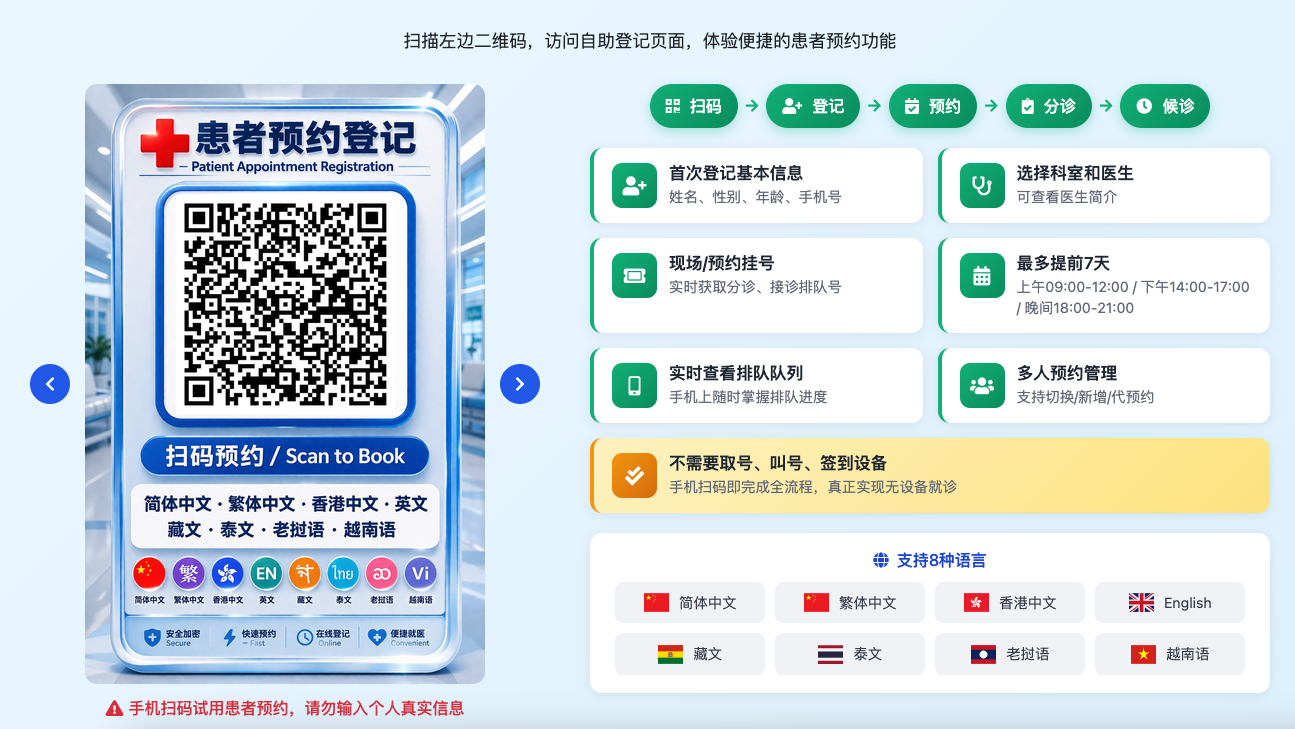
手机扫码试用患者预约。请勿输入个人真实信息(点击图片可查看原图)
支持8种语言:简体中文、繁体中文、香港中文、English、藏文、泰文、老挝语、越南语
说真的。这类问题我见过太多了。每次看到医院同事为选型头疼。我就想,要是早点有人把这些经验分享出来就好了。毕竟。选择不对。后面全是麻烦。选择对了。省心省力。还能提升整个机构的运行效率。希望这篇能帮到正在纠结的你。
你如果有具体需求。也可以去 www.kmhis.com 看看。那里有更详细的技术方案和案例。